Demo storefront
The demo storefront is a small reference app that shows how a real merchant integrates with FiberGate. It's a mock shop selling one digital product, and it's built as a genuinely separate app — it shares no code with FiberGate itself and runs as its own process.
It integrates the way any third-party store would:
- It creates an invoice through
@fibergate/sdk, which makes a real API call to your gateway. - It renders the returned invoice address as a QR code.
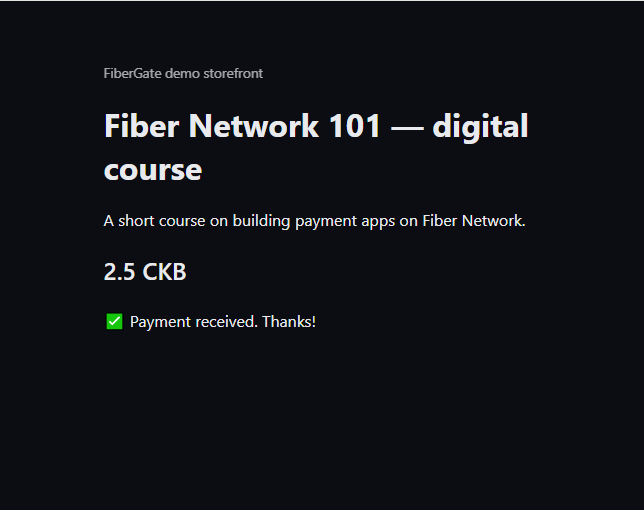
- When the invoice is paid, it receives a signed webhook, verifies the signature with the SDK, and pushes the update to the open browser tab over Server-Sent Events — so the page flips to "paid" with no refresh and no polling.
If you followed the Merchant walkthrough, this is the app used in its "See it live" step.
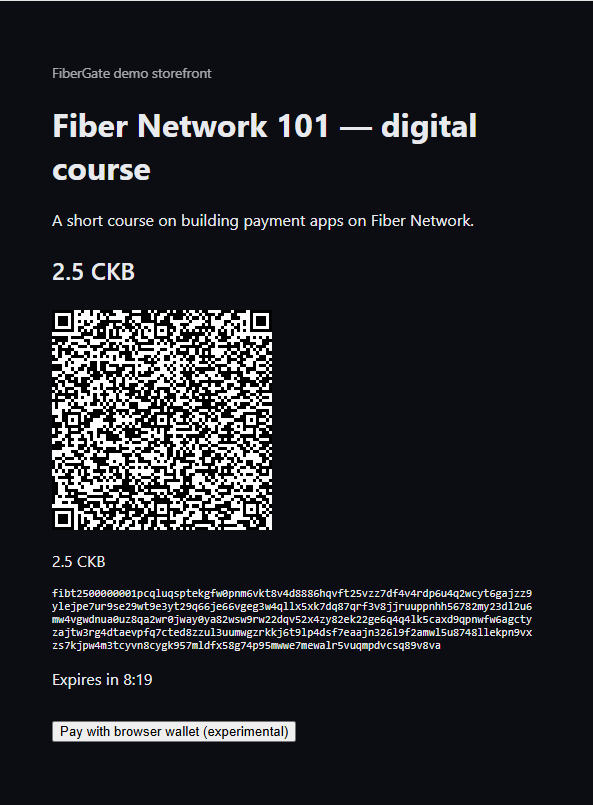
"Pay with browser wallet" — an extra testing shortcut
Once an invoice is showing, there's also an experimental "Pay with browser wallet" button. It runs an actual Fiber node in the browser (via WebAssembly) so you can pay without a separate wallet or node. It exists to speed up manual testing — it isn't part of the "integrates like a real merchant" story that the QR code demonstrates. Two known caveats, not yet verified against a live setup:
- The browser wallet can only reach peers over
wss://(browsers can't open raw TCP). Your node has a WSS path once a real domain is configured — see Public HTTPS deploy. - The browser-wallet library targets Fiber
v0.9.0-rc4; the node here is pinned tov0.9.0-rc6— likely fine, not confirmed.
Try it locally
- Bring up FiberGate the usual way (
pnpm docker:dev, migrate, fill in the root.env) — see Getting started (contributor / local dev). - Register a webhook in the dashboard: Webhooks → Add Endpoint, pointing at the storefront's receiver (
http://localhost:3001/api/webhook) with thepayment.paidevent. Copy the signing secret it shows you — you'll need it in the next step. - Configure the storefront. Copy
apps/demo-storefront/.env.exampletoapps/demo-storefront/.env.localand fill in two values:FIBERGATE_INTERNAL_SECRET(the same value as your root.env) andDEMO_WEBHOOK_SECRET(the signing secret from step 2). This app deliberately doesn't read the root.env, just like a real separate merchant app wouldn't. - Start both apps, each in its own terminal:bash
pnpm dev # fibergate-core, :3000 pnpm --filter demo-storefront dev # demo storefront, :3001 - Open the store at
http://localhost:3001and click Buy now. A QR code appears for the invoice. Pay it from a Fiber testnet wallet that has an open channel to your node — or, if you don't have one handy, use the throwaway payer node in Paying a demo invoice locally. The page updates itself the moment the webhook is verified.
Running it via Docker Compose
The storefront has its own compose overlay, and it's not part of the merchant-facing bundle — a plain docker compose up -d (root file alone) never starts it. It reads its secrets from apps/demo-storefront/.env.local (step 3 above), not the root .env, so create that file first even if you skip local dev and go straight to Docker.
To bring up all four containers together, from the repo root:
docker compose -f docker-compose.yml -f apps/demo-storefront/docker-compose.demo.yml up -dWant to pay a demo invoice without a separate wallet or node? See Paying a demo invoice locally — a contributor/testing tool (a second throwaway node), not something a merchant or integrator needs to understand.
Something not working? See Troubleshooting.